Quick Tune
A live, in-call authoring workspace for tuning agents and scenarios — without redeploying, and without leaving the conversation you're testing.
What's new: Quick Tune now shows which Foundry resource/region backs each model list, blocks BYOM/model mismatches before Apply, preserves the active scenario across an apply, and — most recently — lets you preview a whole scenario's agents, tools, and handoffs before jumping into the full graphical editor.
Quick Tune is the panel behind the tune icon in the call console. It edits a session-scoped copy of an agent or scenario — changes are draft-only until you press Save changes, and they never mutate the shared YAML catalog in registries/agentstore/ or registries/scenariostore/.
Opening Quick Tune
Quick Tune opens as a docked drawer alongside the active call. It always shows the current session id, the active scenario, and a status pill (Ready to try / Unsaved draft) so you always know whether what you're looking at has been applied yet.
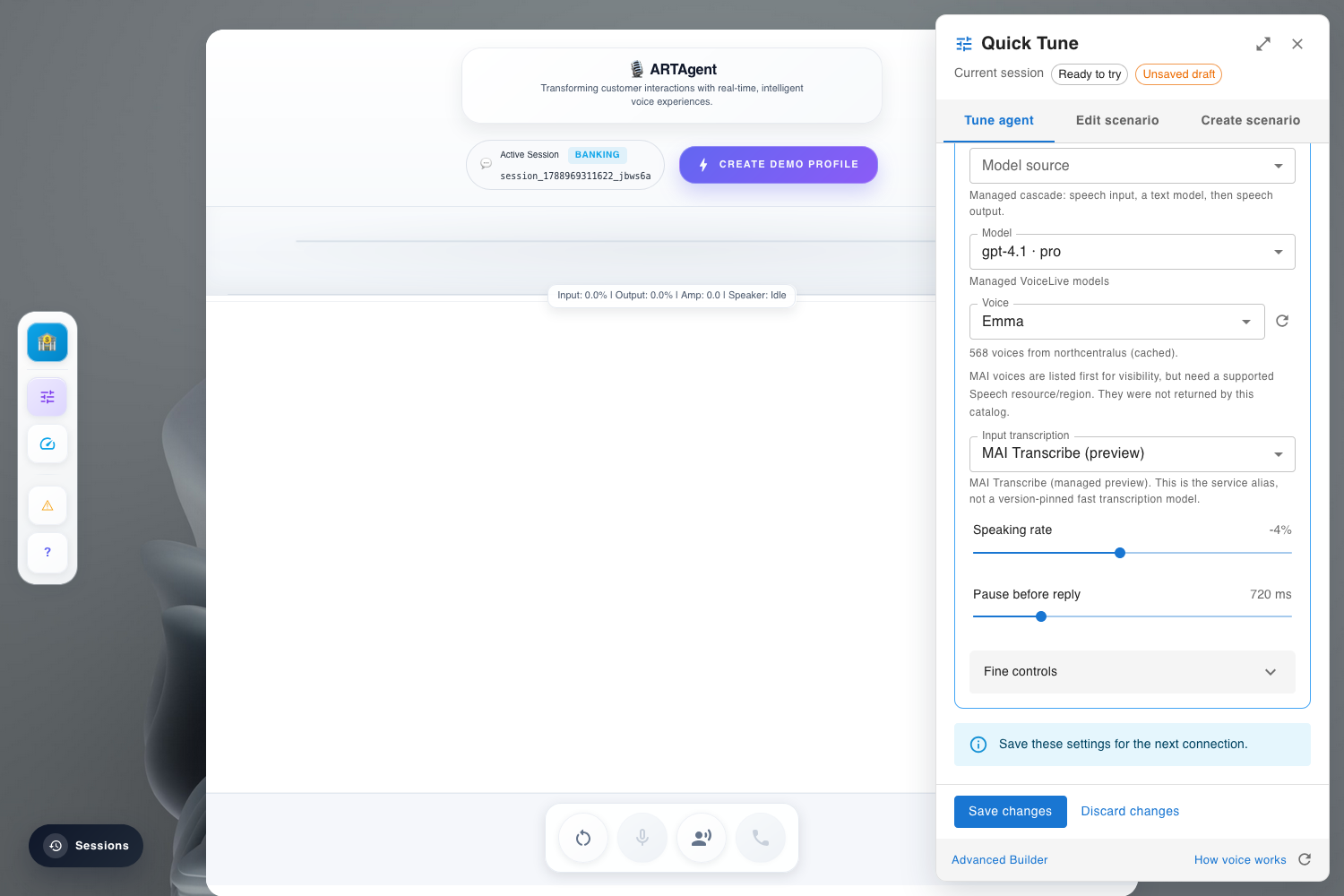
Three tabs cover the whole authoring surface:
| Tab | Edits | Backend endpoint |
|---|---|---|
| Tune agent | The selected agent's model, voice, BYOM mode, tools, prompt, and turn-detection/VAD knobs | PUT /api/v1/agent-builder/session/{session_id} |
| Edit scenario | Handoff routes between agents already in the active scenario | PUT /api/v1/scenario-builder/session/{session_id} |
| Create scenario | A brand-new draft scenario, generated from a prompt or template, previewed before it becomes the active one | /api/v1/scenario-drafts/* |
Tune Agent
The Tune agent tab is scoped to one agent at a time (shown in the Agent to tune selector) — not the whole scenario. It's organized into collapsible cards: Behavior, Tools, and Voice & model, plus fine-grained sliders for speaking rate and pause-before-reply.
Fields map to a fixed set of properties on the session agent payload:
| UI field | Payload field | Used by |
|---|---|---|
| Model source / Model | cascade_model (Cascade) or voicelive_model (VoiceLive) | Both orchestrators |
| BYOM selector | byom.mode | VoiceLive only |
| Input transcription | session.input_audio_transcription_settings.model | VoiceLive only |
| Voice / Voice style | voice.name, voice.style | Both |
| Speaking rate / Pitch | voice.rate, voice.pitch | Both |
| Pause before reply / VAD sliders (Fine controls) | session.turn_detection.* (VoiceLive) or speech.vad_silence_timeout_ms / speech.use_semantic_segmentation (Cascade) | Mode-specific |
| Tools | tools[] | Both |
| Behavior / prompt | prompt, greeting, handoff_trigger | Both |
Two save paths exist, chosen automatically:
- Live-settings fast path — if only VAD/voice changed on an active VoiceLive call, Quick Tune calls
POST /api/v1/agent-builder/session/{session_id}/live-settings, which pushes asession.updateover the open VoiceLive socket with no reconnect. - Full persist path — any model, BYOM, transcription, tool, or prompt change goes through the full
PUT /api/v1/agent-builder/session/{session_id}, which forces a reconnect so the new model/BYOM binding takes effect at connect time.
Voice & Model Catalog
The model and voice dropdowns are populated live from GET /api/v1/agent-builder/voices and the connected Foundry account's deployment list — not a hardcoded catalog. The panel also states which Azure resource and region served that list, because Cascade reads the primary AI Foundry account while VoiceLive reads the separate Voice Live (AVL) account, and the two are often provisioned in different regions.
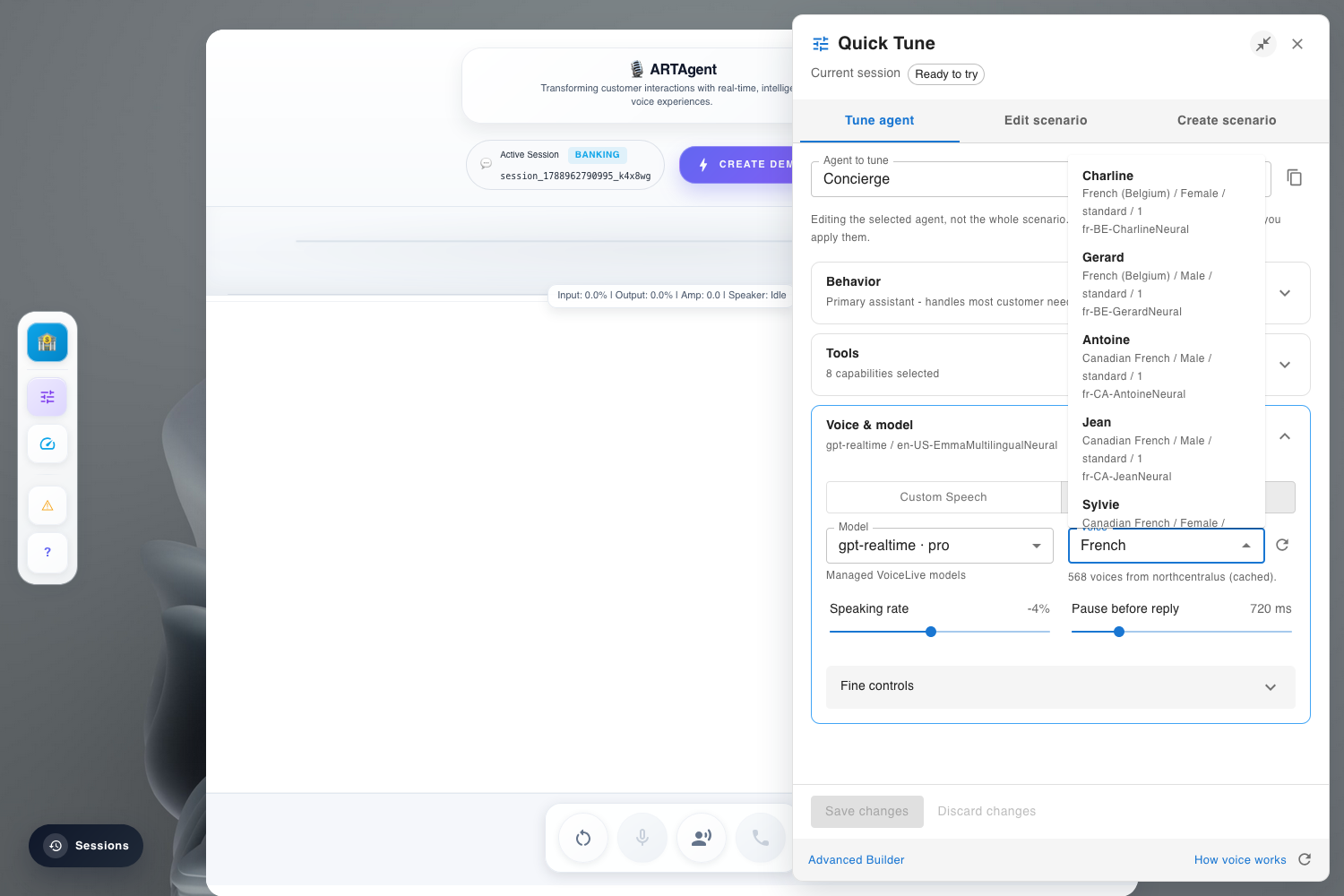
Why this matters: before this attribution was added, the panel only showed a bare deployment count. In one deployment the backend ran in westus2, Cascade's Foundry account in northcentralus, and Voice Live in swedencentral — a trans-Atlantic hop on the realtime audio path that fully explained observed 1100–1300ms VoiceLive time-to-first-token, with nothing in the UI to explain why.
Tool Catalog
The Tools card lists every tool registered in registries/toolstore/registry.py, searchable by purpose, filterable to just the agent's current selection, and annotated with which agent(s) each tool is already assigned to — so you can see cross-agent tool sharing before changing it.
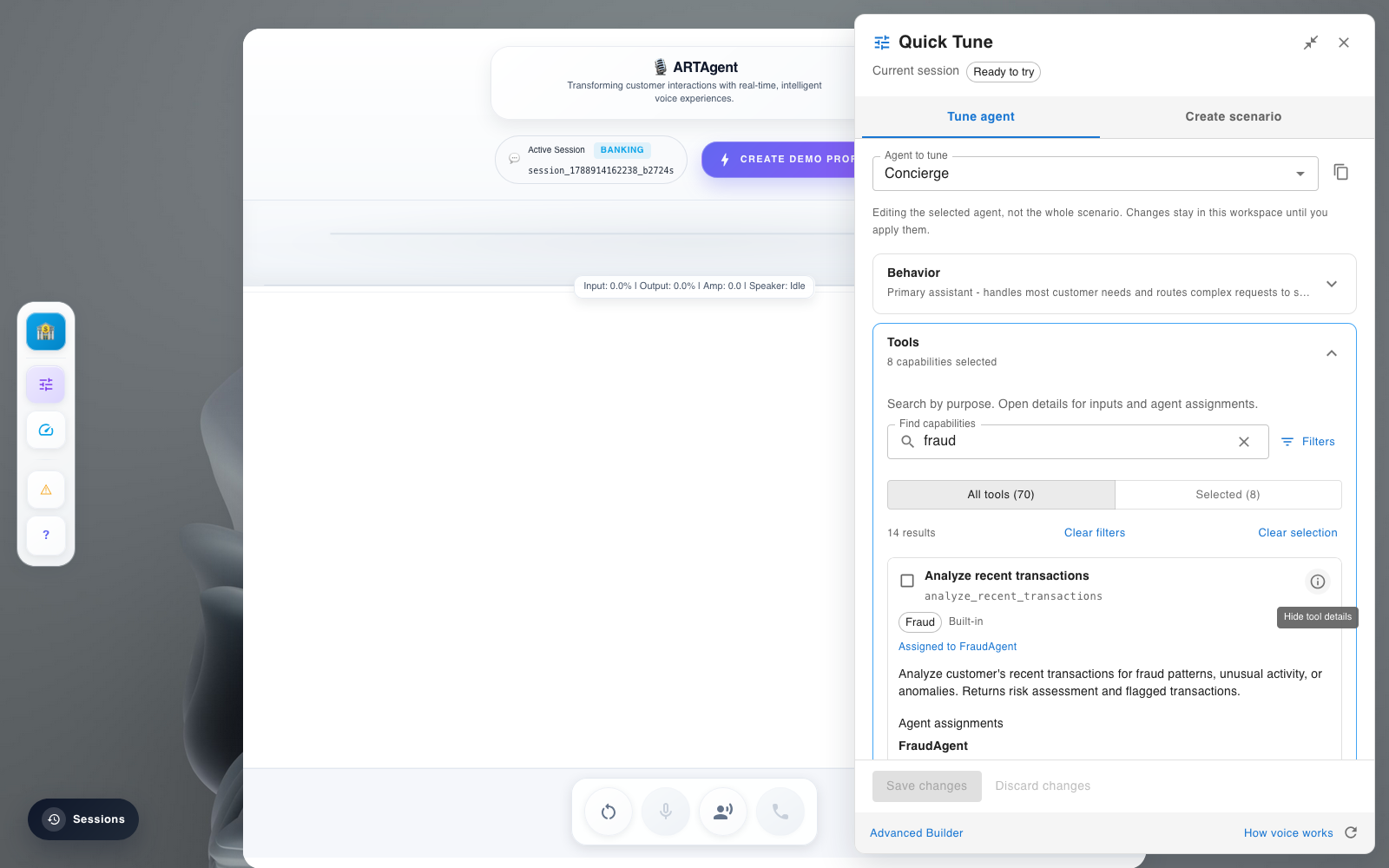
Assigned to FraudAgent) pulled straight from the live registry.Prompt Editor
The prompt editor opens the agent's Jinja/Markdown prompt template with a live Preview pane. Preview renders the template with the session's current context variables (like {{ agent_name }}) — it is explicitly a read-only snapshot, because the runtime also appends scenario handoff instructions and conversation recap at connect/turn time that the static preview cannot reproduce.
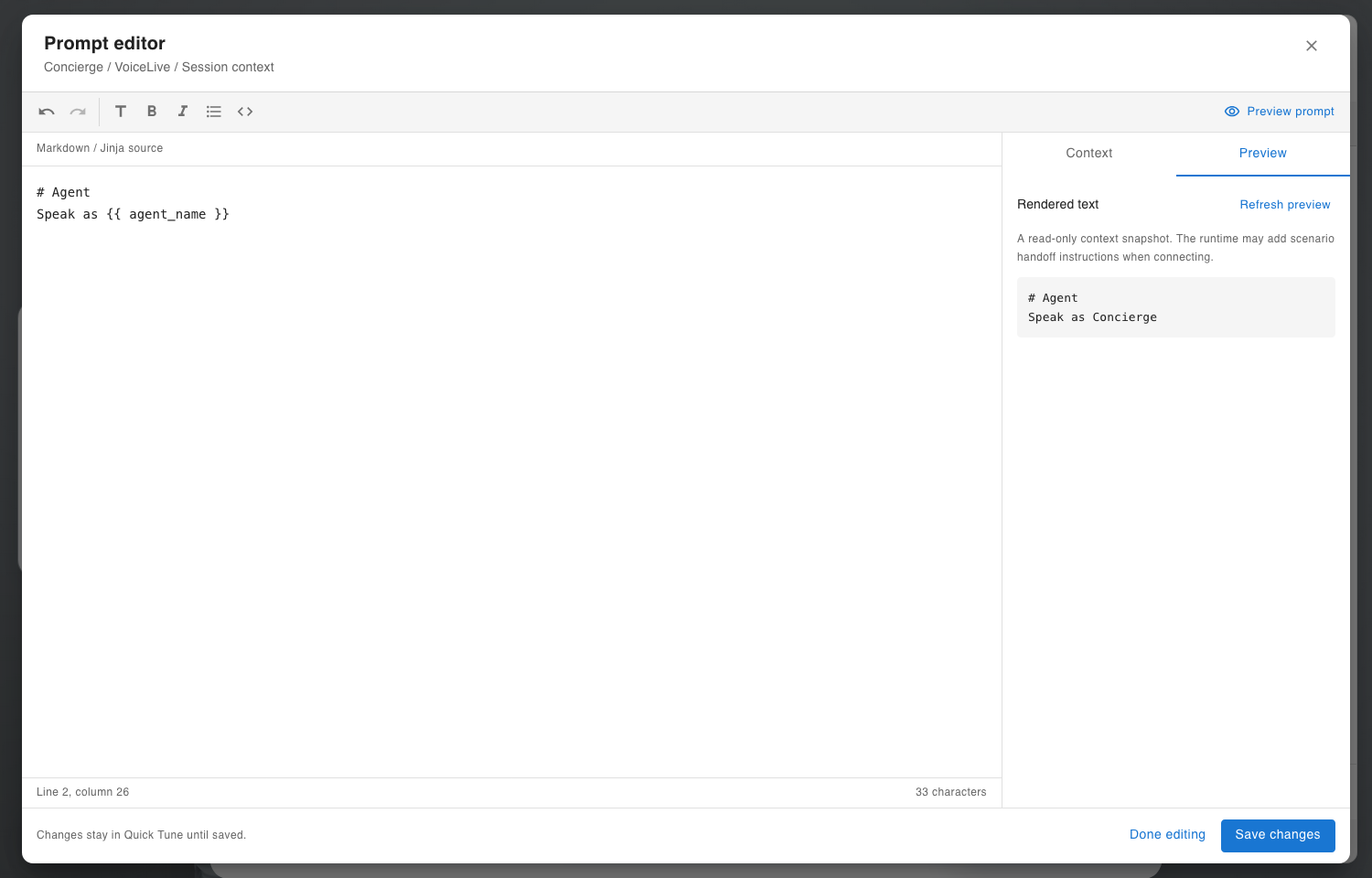
Concierge / VoiceLive / Session context. The right pane renders {{ agent_name }} against the live session and calls out that scenario handoff instructions are added by the runtime, not the preview.Scenario Preview & Editor
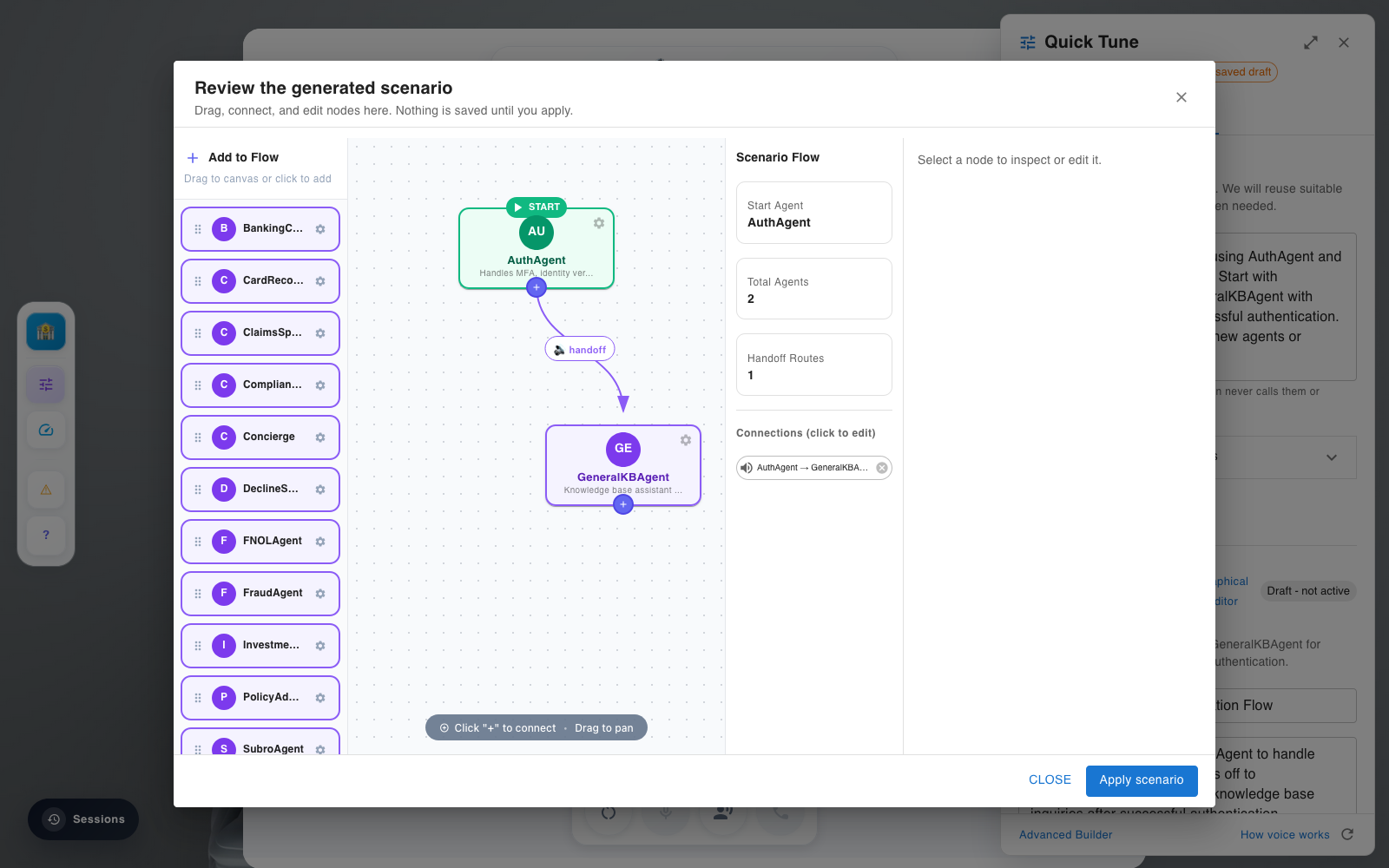
Before d1c0994, previewing a scenario meant jumping straight into the full drag-and-drop graph editor. Scenario preview now shows a bounded, read-only view of the selected scenario's agents and handoffs first, with a clickable path into the full editor only when you need it.
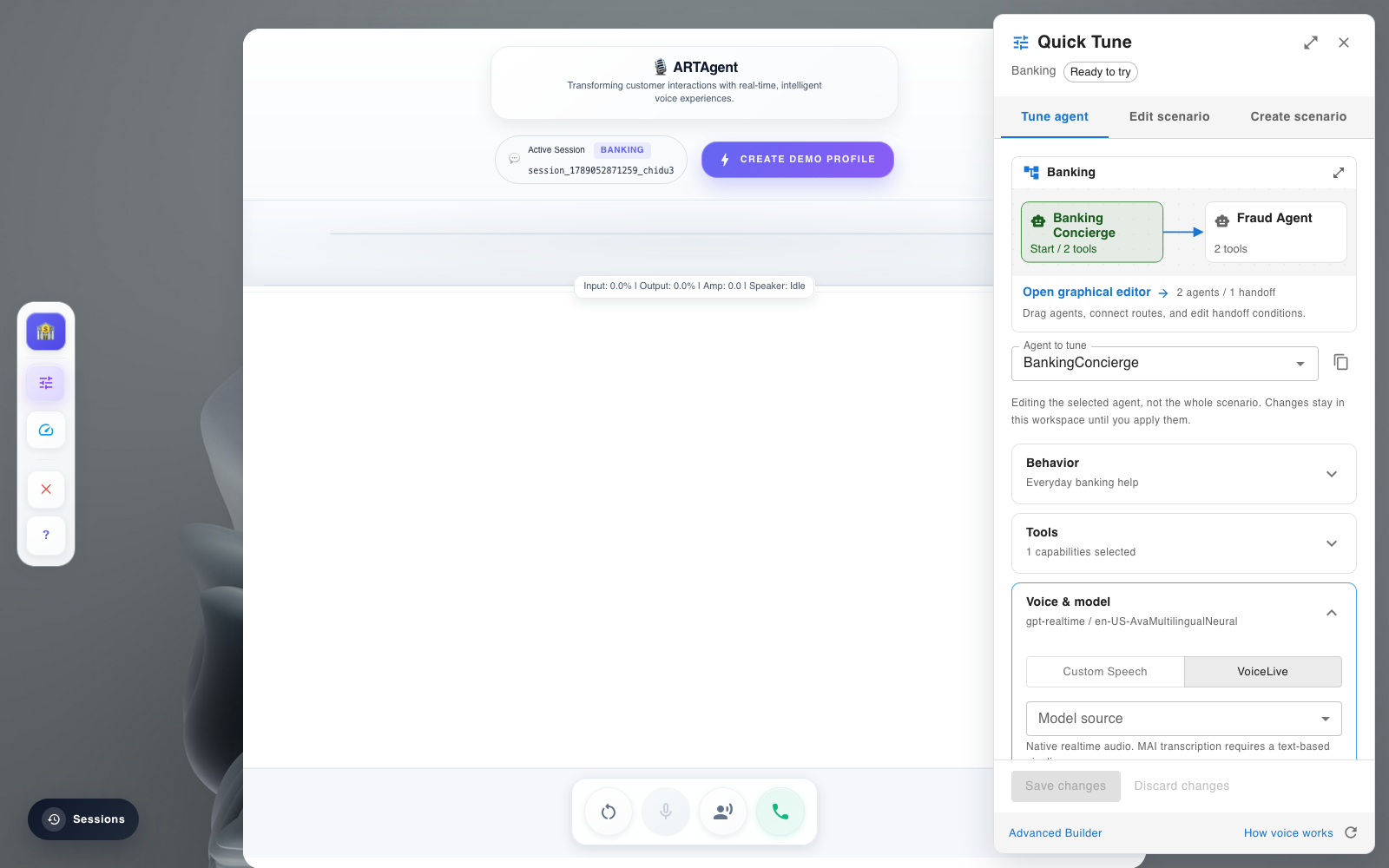
Clicking through (or using Create scenario / Edit scenario directly) opens the full graph: draggable agent nodes, handoff edges, and a per-node/per-edge inspector. Nothing here is saved until Apply scenario.
Apply & Session Binding
Pressing Save changes (agent) or Apply scenario (scenario) is the moment a draft becomes a real, session-scoped runtime object. The backend never edits the shared catalog — it clones into a per-session copy via session_agent_for_edit() and stores it keyed by session_id, so the change only affects the call you're tuning, and survives a reconnect on that same session.
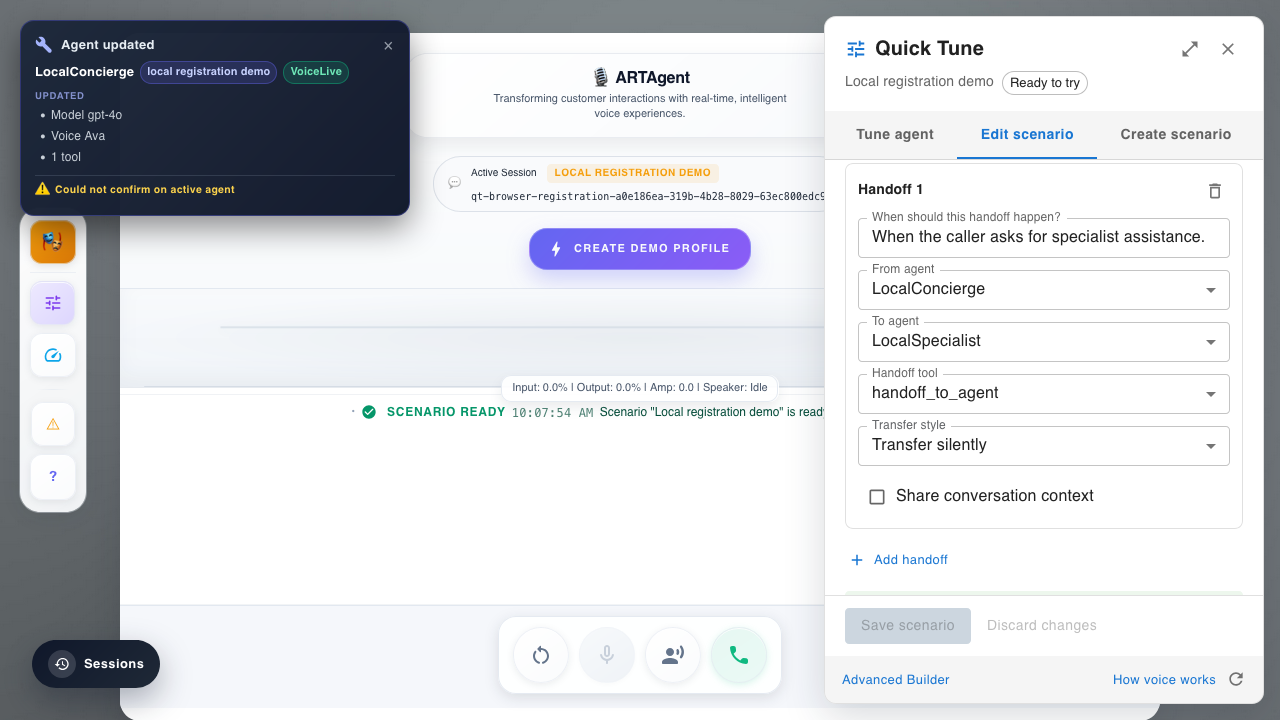
Model gpt-4o · Voice Ava · 1 tool), so the UI never claims success without confirming the session-scoped write.Where each field lands, end to end
| Layer | What happens | Code |
|---|---|---|
| Frontend Apply | Validates the payload (see guardrails), then PUT /api/v1/agent-builder/session/{session_id} or the live-settings fast path. |
utils/quickTune.js (quickTuneRequest), components/QuickTuneWorkspace.jsx |
| Endpoint | _upsert_session_agent(...) validates the merged agent, then stores it. |
api/v1/endpoints/agent_builder.py |
| Session store | session_agent_for_edit() deep-copies the base/scenario agent into session scope (or reuses the session's existing copy); the registry keeps the per-session map plus which agent is active, mirrored into Redis. |
src/orchestration/session_agents.py |
| Cascade pickup | _get_or_create_adapter() injects the session agent into adapter.agents and writes active_agent to MemoManager before sync_from_memo_manager() runs, so a stale memo value can't silently override the just-tuned agent. |
src/orchestration/unified/__init__.py, voice/speech_cascade/orchestrator.py |
| VoiceLive pickup | _update_session_context() rebuilds prompt instructions from the active session agent and the scenario's handoff instructions, and sends session.update only when the resulting fingerprint actually changed. |
voice/voicelive/orchestrator.py |
Runtime Contract: Cascade vs. VoiceLive
Both orchestrators read the same session-scoped agent object, but bind it to the live call differently:
| SpeechCascade | VoiceLive | |
|---|---|---|
| When the tuned agent is bound | Resolved per turn — route_turn() re-checks the session agent every turn, so most edits apply without a reconnect. | Bound at connect time — model, BYOM, and transcription changes require the socket to reconnect. |
| Model field | cascade_model.deployment_id | voicelive_model.deployment_id, gated by byom.mode |
| Turn detection | speech.vad_silence_timeout_ms, speech.use_semantic_segmentation (Azure Speech STT, cannot change mid-stream) | session.turn_detection.*, pushable live via apply_live_session_settings() |
| Handoff routing | HandoffService, built from the scenario resolved for the session | Same HandoffService contract, plus handoff instructions folded into session.update |
| Scenario resolution | resolve_orchestrator_config(session_id=...) must be given the session's scenario name, or handoff routing silently falls back to declarative scenariostore/*/orchestration.yaml defaults | Same requirement — an earlier bug (b8972f7) dropped the session scenario on every VoiceLive reconnect until this was fixed |
The practical effect: on Cascade, most Quick Tune edits are visible on the caller's very next turn. On VoiceLive, anything beyond voice/VAD forces a short reconnect, because the model and BYOM profile are properties of the realtime socket itself, not something that can be renegotiated mid-session.
Validation Guardrails
Quick Tune enforces the same two rules on both the client and the server, so a bad combination is rejected before Apply rather than connecting a session that silently can't speak:
- Managed model requires BYOM off. A non-managed VoiceLive model selected while
byom.modeis empty is blocked (needsByomForModelclient-side;is_managed_voicelive_model(...)server-side). - BYOM profile must match the model's API family. Pairing a realtime model (e.g.
gpt-realtime) with a chat-completions BYOM profile (byom-azure-openai-chat-completion) is blocked (byomProfileConflictclient-side;byom_profile_model_conflict(...)server-side).
Why this was worth guarding: before this validation existed, that exact mismatch let a tuned session connect and report session_contract_ok while the LLM leg of the realtime socket never actually answered — STT kept transcribing into a model deployment that only serves /chat/completions, not /realtime. App Insights showed real pre-tune turns (ttft=1121ms) followed by post-tune turns with every latency metric reading N/A, because no response ever came back.
Quick tick-list for picking a valid combination:
| Mode | Model | BYOM |
|---|---|---|
| Cascade | Any cascade_model deployment on the primary Foundry account | Not applicable |
| VoiceLive, managed | A managed VoiceLive model from the connected AVL account | Off |
| VoiceLive, BYOM | A deployment that exists on the BYOM-connected Foundry resource | On, matching the model's API family (realtime vs. chat completion) |