Architecture
How audio flows from a phone call through AI agents and back.
The system is a real-time voice pipeline that connects callers to AI agents via Azure Communication Services. Two orchestration modes handle the audio differently, but share the same agent framework, tool registry, and session state.
Show original detailed PNG reference →
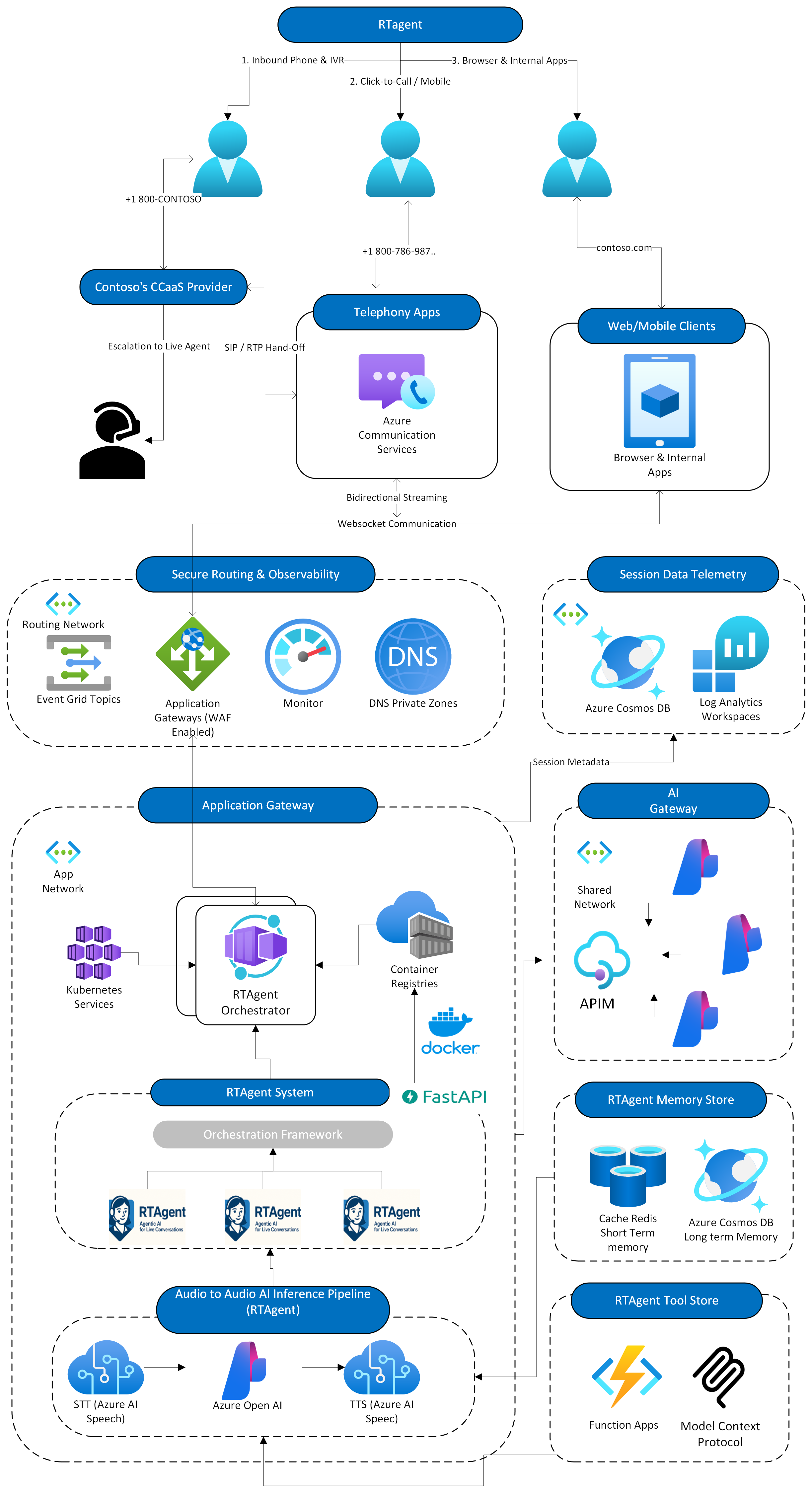
Phone Call → ACS → WebSocket → [Orchestrator] → AI Agent → Voice Response
                                     ↓
                              [STT → LLM → TTS]
Call Lifecycle
Every call follows this sequence regardless of orchestration mode:
Key points: Session state lives in Redis for fast access during the call. Transcripts are archived to Cosmos DB when the call ends. The backend is stateless — any container instance can handle any call via Redis session affinity.
Orchestration Modes
Both modes use the same agents, tools, and handoff logic. The difference is how audio gets processed — and how much of the turn loop you control versus hand to Azure.
ACS_STREAMING_MODE dispatch and converge on the same shared core — agents, tools, handoffs, and MemoManager state. Only the audio surface in the middle differs. Click to expand.Pick the mode per deployment with one env var. Everything below the audio surface — agent definitions, the tool registry, HandoffService, and session-state sync into MemoManager — is byte-for-byte identical across modes, so an agent built for Cascade runs unchanged on VoiceLive.
You orchestrate each component separately. Full control over every step.
Audio In → Azure Speech STT → Transcript → Azure OpenAI → Text → Azure Speech TTS → Audio Out| Component | Options |
|---|---|
| STT | Azure Speech, Whisper, Custom Speech models |
| LLM | Any Azure OpenAI model, or bring your own |
| TTS | 400+ Azure neural voices, custom styles & prosody |
| VAD | Custom silence thresholds, barge-in control |
Best for: on-prem/hybrid, strict compliance, per-component debugging, model flexibility.
Azure-hosted pipeline handles audio in one hop. Lowest latency, managed operations.
Audio In → Azure VoiceLive SDK (STT + LLM + TTS managed) → Audio Out| Feature | Details |
|---|---|
| Latency | ~200ms end-to-end |
| VAD | Server-side automatic turn detection + noise reduction |
| Tools | Native function calling via Realtime API |
| Voices | HD voices like en-US-Ava:DragonHDLatestNeural |
Best for: speed to production, lowest latency requirements.
# Sets the DEFAULT orchestration mode for ACS telephony calls
export ACS_STREAMING_MODE=MEDIA       # SpeechCascade
export ACS_STREAMING_MODE=VOICE_LIVE  # VoiceLive
ACS_STREAMING_MODE only sets the default pipeline that inbound ACS phone calls use; the agent framework is identical across both modes.
Control & tradeoffs at a glance
The two modes are not feature-equivalent. Cascade hands you every component to tune; VoiceLive hands the whole audio loop to Azure for the lowest latency. Pick per workload.
| Dimension | SpeechCascade you control | VoiceLive Azure-managed |
|---|---|---|
| Latency | ~400 ms end-to-end (3 hops) | ~200–250 ms (single hop) |
| Components | Swap STT, LLM, TTS independently | One managed pipeline — no swapping |
| LLM surface | Chat Completions or Responses API (_process_llm) | Realtime API only (gpt-realtime) |
| VAD / barge-in | Client-side thresholds + ThreadBridge cancellation | Server-side automatic — not tunable |
| STT models | Custom Speech + phrase lists | Built-in only |
| Voices | 400+ neural voices, per-agent styles | HD voices only (e.g. DragonHDLatest) |
| Deployment | On-prem / hybrid endpoints supported | Azure cloud only |
| Turn model | Synchronous per-turn (process_user_input) | Event-driven (ServerEventType.*) |
How each mode manages turn context & state
Both modes read and write the same MemoManager via sync_state_from_memo() / sync_state_to_memo() — so active agent, visited agents, profile, and handoff context survive across turns and container restarts. They differ in how the model sees that context on each turn:
- SpeechCascade assembles the prompt itself — current agent's per-agent thread plus de-duplicated cross-agent context (
_get_conversation_history), then ships it to Azure OpenAI. You decide exactly what the model sees, so this is where the planned compaction levers (rolling window, summarizer) plug in. - VoiceLive keeps conversation state inside the realtime connection. The orchestrator re-injects a throttled session recap (recent user messages, slots, last assistant turn) via
session.update(instructions=…)before responses, and history is per-connection only —visited_agentsis intentionally not replayed to avoid stale context on a fresh call. - Shared truth. Slots, tool outputs, and the user profile always land in
MemoManagerregardless of mode, so a handoff or a Cosmos archive looks identical either way.
VoiceLive: native vs cascaded common confusion
"VoiceLive" isn't a single architecture — the model you pick decides how audio is handled. This trips people up constantly, especially around what the transcript actually represents. Explore it below — toggle modes and the Inside VoiceLive options to see how the audio flows.
⚠️ Don't treat the native transcript as ground truth. Because the model reasoned on audio — not the transcribed text — the transcript can differ from what actually drove the reply. Avoid using it for routing decisions, compliance records, or evals. If you need the text the model truly acted on, use a cascaded path (Custom Speech, or cascaded-inside-VoiceLive), where a real STT step produces the actual recognized text.
Realtime models can't be fine-tuned and bill premium audio tokens. Before committing to native speech-to-speech in production, benchmark it against higher-throughput text LLMs (the cascade) with a robust eval suite in Azure AI Foundry.
Agent Framework
Agents are defined in YAML, not Python classes. Scenarios wire them together. Tools give them abilities.
custom Reminder — this is our own lightweight framework, not Microsoft Agent Framework. See the "Why this complexity?" section below for the positioning note and reasoning.
Three concepts
| Concept | Defined in | What it does |
|---|---|---|
| Agent | agentstore/*/agent.yaml |
AI assistant with a role, greeting, system prompt, and tool list |
| Scenario | scenariostore/*/orchestration.yaml |
Wires agents together with handoff routes and entry points |
| Tool | toolstore/registry.py |
Callable function shared across all agents (@register_tool) |
Separation of concerns
- Same agent behaves differently in different scenarios (banking vs. insurance)
- Handoff routing is declarative — change the YAML, not the code
- Tools are shared across all agents via a central registry
Minimal agent definition
# agentstore/my_agent/agent.yaml
name: MyAgent
description: Does something useful
handoff:
  trigger: handoff_my_agent
greeting: "Hi, I'm the specialist you need!"
tools:
  - my_tool
  - handoff_concierge
prompts:
  path: prompt.jinja
Browse all agents → · Create your own →
Storage Tiers
Three tiers, each optimized for its access pattern:
MemoManager handles warm-tier persistence. Never store conversation state in-memory globals — it breaks container scaling.
Session Runtime
How the runtime keeps many concurrent calls isolated, how session memory moves through MemoManager / Redis / Cosmos, and what hooks fire on every turn. Everything below is grounded in the current implementation — the names map 1:1 to functions and events in apps/artagent/backend/voice/.
Concurrent session handling and speech-channel isolation
Each call is isolated by session_id + call_connection_id, with per-session handlers, per-session turn state, and per-session outbound envelopes. This prevents cross-talk when many conversations run concurrently on the same container.
| Isolation boundary | How isolation is enforced | Why it matters for concurrency |
|---|---|---|
| Turn ownership | Every user/assistant message carries turn identifiers; tool/handoff boundaries advance effective turn IDs instead of reusing stale IDs. | Prevents transcript and UI frame collisions across overlapping tool calls. |
| Speech event lanes | Speech Cascade uses a dedicated queue and thread bridge per handler instance; Voice Live tracks active response IDs per session. | Audio/control events from one call cannot drain or cancel another call's audio lane. |
| Session state | Session metadata is stored in MemoManager and synchronized to Redis, then restored into orchestrator state on demand. | Stateless container scaling works without losing active agent/context. |
| WebSocket envelopes | Outbound events include session-scoped metadata and turn IDs before broadcast. | UI and telemetry streams stay correctly partitioned under load. |
Session memory lifecycle (what persists, when)
The hot path stays in MemoManager. Redis is the cross-container source of truth. Cosmos is cold archive only — never read on the hot path. Reads happen once on session start; writes happen on tool/turn boundaries and on cleanup.
- Session starts: orchestrator reads prior state (active agent, visited agents, profile, handoff context) from MemoManager/Redis.
- Each turn: orchestrator updates active agent and session vars, then writes back to MemoManager as turn state evolves.
- Turn/tool boundaries: effective turn IDs are advanced for post-tool segments to keep message history coherent.
- Session stop/cleanup: handler flushes MemoManager to Redis asynchronously; cold archival to Cosmos remains post-call oriented.
Per-turn memory flow and long-session strategies
Each turn fires the same fixed sequence of ten calls against MemoManager. The hot path is entirely in-process; Redis is touched once per turn via a fire-and-forget task; Cosmos is only touched after the call ends. Where the system stays honest is also where it has work left to do — there is no automatic history compaction today, so longer sessions grow the per-agent thread monotonically.
MemoManager — in-process work (purple), the one LLM round-trip (green), and the async Redis flush (blue). The growth band shows what accumulates per turn, and the dashed strip names the four compaction levers planned for long sessions.What actually happens on every turn (verified against voice/speech_cascade/orchestrator.py)
on_final(text)(Cascade) orTRANSCRIPTION_COMPLETED(Voice Live) hands the finalized utterance to the orchestrator.sync_state_from_memo(cm, available_agents=…)hydratesactive_agent,visited_agents,session_profile, and anypending_handoff.cm.append_to_history(active_agent, "user", text)writes the user turn into the active agent’s thread and stampslast_activity.cm.get_history(active_agent)reads that agent’s full thread — no windowing, no token cap._get_conversation_history(cm)merges in substantive user messages from other agents (dedup by lowercased content, filters <10 chars / “welcome…”) so handoffs don’t drop context._build_session_context(cm)pullssession_profile,caller_name,customer_intelligence, andinstitution_nameout ofCoreMemoryfor prompt-template variables.agent.run(…)calls the LLM with[system, …cross_agent_context, …agent_history, user_turn]; tool calls advanceturn_sequenceviaadvance_turn_for_tool().cm.append_to_history(active_agent, "assistant", response)appends the assistant turn into the same per-agent thread.sync_state_to_memo(cm, active_agent=…, visited_agents=…)persists orchestration state back intoMemoManager.asyncio.create_task(cm.persist_to_redis_async(redis_mgr))mirrorsMemoManagerto Redis without blocking the next turn. Cosmos is untouched untilbuild_and_flush(cm, cosmos)after the call ends.
Why a long session can degrade today
- Per-agent thread is append-only.
ChatHistory.append()never trims. A 30-minute call with one agent and ~2 turns/minute lands ~60 user+assistant pairs into a single thread that ships in full on every prompt build. - Cross-agent merge can stack.
_get_conversation_historyprepends substantive user messages from every other visited agent. Repeated handoffs grow the prefix even when the active agent’s own thread is short. - No token budgeting. The Voice Live
context_windowfield (default 4000) only configures the realtime session — it doesn’t cap what we ship to the model. Foundry/AOAI calls in Cascade currently send the whole assembled list. - What partially protects us today. Per-agent partitioning + handoff-as-natural-reset means short tasks usually finish inside one agent before the thread gets large. That’s a workload assumption, not an architectural guarantee.
Strategies to keep performance flat as context fills up
The four levers below are the planned compaction surface. Each one slots in between step ⑧ (append assistant) and step ⑨ (sync state) so it runs once per turn, off the user-visible critical path.
| Lever | Where it lives | What it changes | Tradeoff |
|---|---|---|---|
| Rolling window | Wrap cm.get_history(active_agent) in a windowed reader that returns the last N turns or T tokens. |
Bounds prompt size; MemoManager still keeps full history for Cosmos archival. |
Drops earlier callbacks (“as I mentioned earlier…”) unless the summarizer below also runs. |
| Turn summarizer | New cm.summarize_thread(agent, before_turn=k) that replaces stale turns with one {"role":"system","content":"…summary…"} note. |
Preserves the gist of earlier turns inside the prompt budget. | Adds a background LLM call; needs an idempotency guard so we don’t re-summarize. |
Fact extraction → CoreMemory |
Background pass over completed turns lifts named entities (order #, account, preference) into typed CoreMemory slots. |
Most repeated lookups become cm.corememory.get("order_id") instead of re-reading transcript. |
Requires a slot schema per agent and a small extractor; quality depends on extractor. |
| Cosmos RAG retrieval | On step ⑤, ask Cosmos (or a vector index over archived turns) for the K most relevant past-turn snippets to inject into the prompt. | Brings back cross-call memory without ballooning the per-call prompt. | Adds 30–100ms to the turn unless the retrieval runs in parallel with prompt assembly. |
Where to start: the rolling window is the cheapest defense — a single change in _get_conversation_history bounds prompt growth without any new background work. The summarizer and fact-extractor become valuable once we see real-call traces with >40-turn agents. RAG over Cosmos is the right answer once we have a corpus of past calls worth retrieving from.
Turn-by-turn orchestration hooks: Speech Cascade vs Voice Live
Same logical turn, two different surfaces. Speech Cascade reacts to local on_partial / on_final callbacks coming off the Speech SDK thread; Voice Live reacts to ServerEventType.* messages coming off the realtime model websocket. Both converge on the same session-state contract.
| Phase | Speech Cascade hooks | Voice Live hooks |
|---|---|---|
| User starts speaking | on_partial(...) callback triggers immediate barge-in scheduling via thread bridge. |
INPUT_AUDIO_BUFFER_SPEECH_STARTED triggers turn start, barge-in, stop-audio, and new span bookkeeping. |
| User utterance finalized | on_final(...) enqueues SpeechEventType.FINAL into per-session speech queue. |
CONVERSATION_ITEM_INPUT_AUDIO_TRANSCRIPTION_COMPLETED finalizes user transcript and emits turn-scoped message. |
| Streaming transcript feedback | Optional on_partial_transcript callback feeds live UI text without committing a final turn. |
CONVERSATION_ITEM_INPUT_AUDIO_TRANSCRIPTION_DELTA sends streaming user transcript envelopes. |
| Assistant audio output | Route turn processing drives TTS queueing and sequential playback from orchestrator output. | RESPONSE_AUDIO_DELTA streams assistant audio frames; RESPONSE_AUDIO_DONE marks completion. |
| Tool execution / handoff | Turn IDs can be advanced after tool calls for clean post-tool message segments. | RESPONSE_FUNCTION_CALL_ARGUMENTS_DONE executes tools, then continues response/create flow. |
| Turn completion | Queue drains and orchestrator state sync persists session updates through MemoManager. | RESPONSE_DONE finalizes playback and turn metrics before next speech-start event. |
Practical implication: Speech Cascade gives explicit local control over callback and queue boundaries; Voice Live gives explicit realtime event hooks from the model connection. Both converge on the same session-state contract via MemoManager + Redis.
Production Hardening
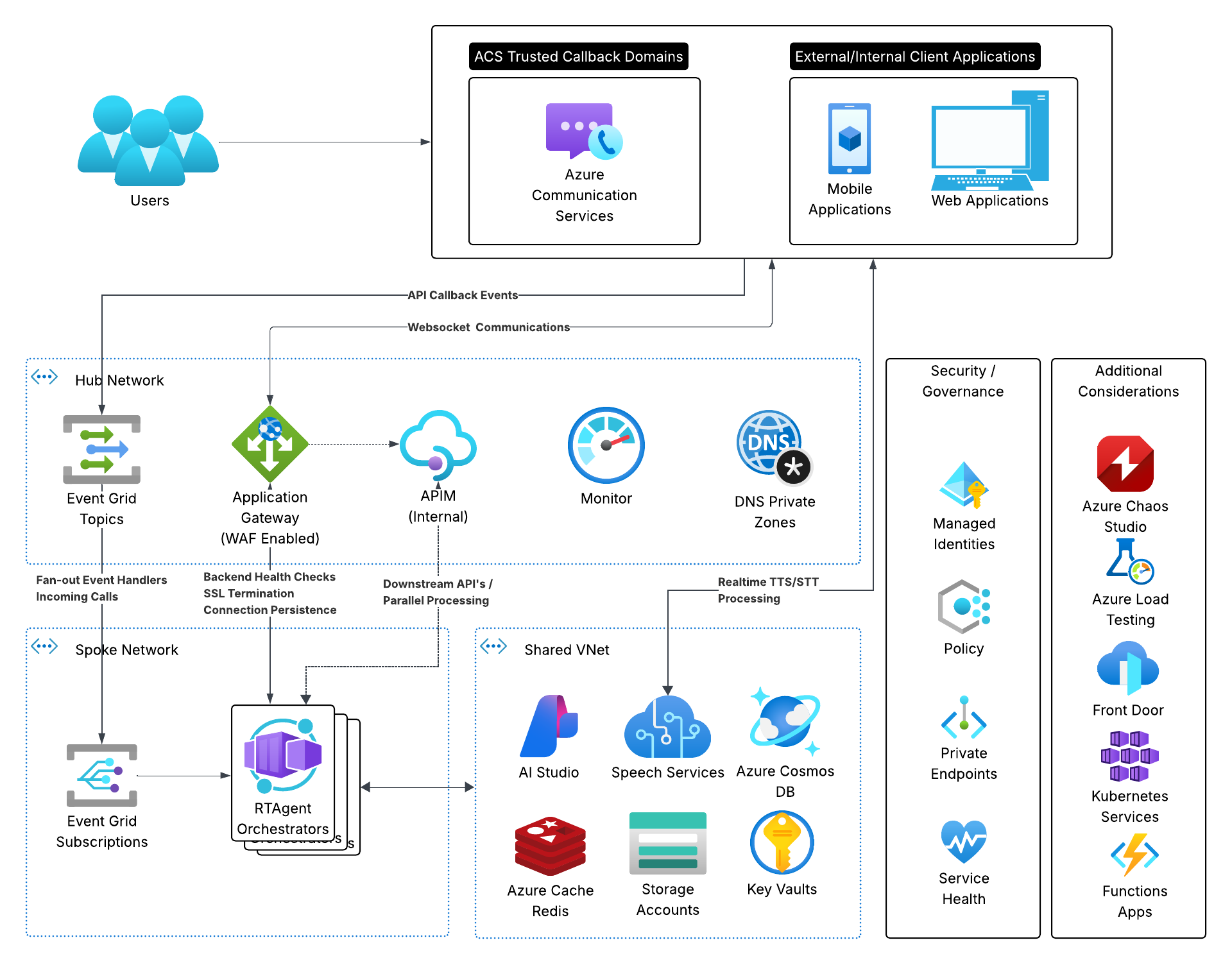
This section is the honest read on the security posture: what the production reference targets, what the threat surface is, and what the current terraform actually ships with the defaults vs. what is variable-gated or still planned. The repurposed “Azure Services” inventory and App Configuration mapping live here too, since both are part of the hardening story.
Production reference architecture
Show original detailed PNG reference →
Threat surface and mitigations
Eight surfaces to defend, mapped to where the mitigation lives in the codebase.
| Surface | Risk | Mitigation | Where it lives |
|---|---|---|---|
| Inbound telephony (ACS) | Spoofed callers, replayed sessions, unsolicited inbound calls hitting the WebSocket. | DTMF + ANI composite session key pre-stored in Redis by AWS Connect / SBC; ACS IncomingCall Event Grid webhook validates the composite key before authorizing media WS. API-initiated calls use direct call_connection_id lookup. |
docs/security/authentication.md |
| Media WebSocket | Unauthenticated WS upgrade attaching to a live call; cross-session bleed. | Custom JWT validated on WS handshake; WS session correlated to the call session via Redis composite key. | apps/artagent/backend/api/v1/endpoints/media.py + Redis session store |
| Frontend → backend (HTTPS) | Cross-origin abuse, credentialed CORS leaks. | Container Apps cors_policy with explicit frontend / backend origin lists and support_credentials toggle. |
infra/terraform/modules/containers/main.tf + modules/webapps/variables.tf |
| App → Azure service identity | Long-lived keys leaking from env vars or container images. | System-assigned managed identity on every container app; RBAC role assignments for Foundry, Voice Live, ACS, Storage, AppConfig, Key Vault, ACR pull, Cosmos. | infra/terraform/ai-foundry.tf, ai-foundry-vl.tf, communication.tf, data.tf, cardapi.tf |
| Secrets at rest | Connection strings checked into config or env. | Key Vault with RBAC authorization (rbac_authorization_enabled = true); container apps reference secrets by key_vault_secret_id rather than inline values. |
infra/terraform/keyvault.tf + modules/containers/main.tf |
| Service-to-service TLS | Downgrade attacks against the data plane. | Storage min_tls_version = "TLS1_2"; Redis Enterprise minimumTlsVersion = "1.2"; Cosmos OIDC connection string forces tls=true. |
infra/terraform/data.tf, redis.tf |
| Cosmos data plane auth | Shared password credentials reused across services. | App connects with authMechanism=MONGODB-OIDC via managed identity; admin password is stored in Key Vault for break-glass only. |
infra/terraform/data.tf |
| Network exposure | Public data planes reachable from the internet. | Variable-gated toggles already in place (cosmosdb_public_network_access_enabled, Foundry public_network_access). Private endpoints, NSP, and WAF are reference-architecture targets and not in default terraform yet. |
infra/terraform/variables.tf, modules/ai/foundry.tf |
Hardening status — in place / variable-gated / planned
What the default azd up actually ships today vs. what is one variable flip away vs. what is still reference-only. Use this to size remaining work for a given environment.
| Control | Status | How to verify / change |
|---|---|---|
| Managed identity on backend, frontend, MCP containers | in place | azurerm_role_assignment.*_backend_* in infra/terraform/. |
| Key Vault with RBAC authorization (no access policies) | in place | rbac_authorization_enabled = true in keyvault.tf. |
| Cosmos MongoDB OIDC (passwordless app auth) | in place | OIDC connection string built in data.tf; admin password is Key Vault break-glass only. |
| TLS 1.2 minimum on Storage and Redis Enterprise | in place | min_tls_version / minimumTlsVersion in data.tf, redis.tf. |
| App Configuration + feature flags (no secrets in env) | in place | APPCONFIG_KEY_MAP + FEATURE_FLAG_MAP in apps/artagent/backend/config/appconfig_provider.py. |
| Per-app CORS origin allow-list with credentials toggle | in place | cors_policy in modules/containers/main.tf; origins in modules/webapps/variables.tf. |
| WebSocket auth (DTMF + ANI composite key, JWT on WS) | in place | docs/security/authentication.md + api/v1/endpoints/media.py. |
| Cosmos public network access | variable-gated | cosmosdb_public_network_access_enabled in variables.tf. Default is open for local dev; flip to false for production envs. |
| Foundry public network access | variable-gated | public_network_access on the AI module (modules/ai/foundry.tf). Set to Disabled when private endpoints are wired up. |
| MongoDB cluster firewall | variable-gated | azapi_resource.mongo_firewall_all in data.tf opens 0.0.0.0–255.255.255.255 when public access is enabled. Disable along with public access for production. |
| Private endpoints for Foundry / Speech / Redis / Cosmos / Key Vault | planned | Shown in the reference diagram but no azurerm_private_endpoint resources in default terraform. Requires hub-spoke VNet + private DNS zones added per service. |
| Application Gateway / WAF in front of Container Apps | planned | No azurerm_application_gateway in terraform today. Add as the public ingress when moving off the Container Apps default fqdn. |
| Network Security Perimeter (NSP) around ACS | planned | Reference-only in the production diagram; NSP resource not yet in terraform. Track ACS NSP GA before promising in customer architectures. |
Service inventory
The same services the previous “Azure Services” section listed, kept here as the hardening surface they actually live on.
| Service | Purpose | Config prefix |
|---|---|---|
| Azure Communication Services | Telephony, WebSocket audio | ACS_* |
| Microsoft Foundry | Model/runtime endpoint for GPT-4o and realtime orchestration | AZURE_OPENAI_* |
| Azure AI Speech | STT / TTS voice services used by the Foundry-based voice stack | AZURE_SPEECH_* |
| Azure Redis | Session cache | REDIS_* |
| Cosmos DB (Mongo vCore) | Persistent storage | AZURE_COSMOS_* |
| App Configuration | Dynamic config & feature flags | AZURE_APPCONFIG_* |
| Application Insights | Observability | APPLICATIONINSIGHTS_* |
| Container Apps | Hosting | Terraform / Bicep |
Azure App Configuration mapping (high level)
Runtime settings are loaded from Azure App Configuration using hierarchical keys, then synchronized to environment variables used by the service. Local .env.local values can still override for developer workflows.
| App Config key | Environment variable consumed by runtime | Used for |
|---|---|---|
azure/openai/endpoint | AZURE_OPENAI_ENDPOINT | Microsoft Foundry model endpoint |
azure/openai/deployment-id | AZURE_OPENAI_CHAT_DEPLOYMENT_ID | Model deployment selection |
azure/speech/endpoint | AZURE_SPEECH_ENDPOINT | Azure AI Speech service endpoint |
azure/acs/endpoint | ACS_ENDPOINT | ACS call/media integration |
azure/redis/hostname | REDIS_HOST | Session and cache backend |
azure/cosmos/connection-string | AZURE_COSMOS_CONNECTION_STRING | Transcript/audit persistence |
azure/appinsights/connection-string | APPLICATIONINSIGHTS_CONNECTION_STRING | Telemetry and traces |
app/pools/tts-size | POOL_SIZE_TTS | TTS client pool sizing |
app/voice/default-tts-voice | DEFAULT_TTS_VOICE | Default voice selection |
| Feature flag: warm-pool | WARM_POOL_ENABLED | Warm pool behavior toggle |
Full key coverage is defined in apps/artagent/backend/config/appconfig_provider.py in APPCONFIG_KEY_MAP and FEATURE_FLAG_MAP.
Cross-cloud integration
The accelerator supports hybrid deployments. AWS Connect traffic can be routed to Azure via a Certified Session Border Controller — Azure handles the AI workload while the carrier path and call routing stay on the partner side.
Hardening minimums before going to production: flip cosmosdb_public_network_access_enabled to false, set the Foundry module public_network_access to Disabled, drop the Mongo firewall-all rule, wire private endpoints for Foundry / Speech / Redis / Cosmos / Key Vault into a hub-spoke VNet, and put an App Gateway + WAF in front of the Container Apps ingress. Everything else in the matrix above is already on by default.
Performance Targets
This is a real-time voice system. Latency kills user experience.
| Operation | Target |
|---|---|
| STT recognition | < 200ms |
| LLM first token | < 500ms |
| TTS first audio chunk | < 150ms |
| End-to-end turn | < 1 second |
| Agent handoff | < 50ms |
Anti-patterns to avoid: Creating new clients per request (use pools), blocking I/O in async handlers, large context windows without compaction, synchronous DB calls, unbounded audio buffers.
Why this complexity?
If you've skimmed the codebase and wondered why there's a custom orchestrator, per-stage streaming, a pool layer, a VAD layer, and a barge-in cancellation path — this section is the answer. Real-time voice has constraints that don't show up in chat or batch-LLM systems, and those constraints drove every structural choice.
1 · The framework choice — own the loop, not the abstraction
Most agent frameworks (Microsoft Agent Framework, LangChain, etc.) hand you a single agent.run() call that returns when the whole turn is done. That's perfect for chat and async work. For voice, it's the wrong shape — you lose the seams where latency and interruption live.
Opinionated note: if you're starting greenfield and don't need per-turn audio control, Agent Framework is worth evaluating first. If you need a realtime voice loop with barge-in and fine-grained telemetry, keep the custom orchestrator and integrate at the workflow boundary.
Plugging in Agent Framework, Foundry agents, and Voice Live
You don't have to choose "all custom" or "all managed." The realtime loop above has clean seams where Microsoft's managed building blocks could slot in — each with its own latency profile to weigh against the ~1-second turn budget. Today the reason + tool stage runs ART's own custom agent framework; the items below are the supported plug-in points, some shipped and some potential.
- Agent Framework at the reason stage potential · not current state. MAF is two things — agents (LLM + tools/MCP) and graph workflows (type-safe routing, checkpointing, human-in-the-loop) — built on model clients, an agent session for state, middleware, and MCP clients. It maps cleanly onto our reasoning + tool-dispatch stage, so it's a natural future drop-in: keep the audio transport here, and let MAF own the agent graph, calling the Responses API on your Foundry project endpoint. This accelerator does not use MAF today — it ships its own custom, latency-tuned agent framework around the realtime loop; MAF is shown here as where it would plug in.
- Voice Live as a managed audio channel. The Voice Live API is exposed as a Foundry Agent Service tool that collapses speech-in and speech-out into one managed WebSocket hop (Realtime-API compatible), with 600+ Azure neural voices, custom voice, and models like
gpt-realtime. Because the orchestrator supports both pipelines, Voice Live can take over the entire audio channel — VAD, STT, and TTS — while MAF still sits in the middle to customize the agentic layer. Use it when you want Azure to own the whole audio surface; use the custom Speech cascade when you need per-component control.
Hosted agents vs. prompt agents — where every millisecond counts
Foundry Agent Service offers two agent types, and the difference matters for voice. A prompt agent is configuration only (instructions + model + tools) — fully managed, nothing to scale, but you call it over the Responses API, so every turn pays a network hop and you can't reshape the orchestration. A hosted agent is your container (MAF, LangGraph, or custom) run by Foundry with a managed endpoint, autoscale, and a dedicated identity — great performance and full control once it's running.
The warmup catch. Per the hosted-agents docs, each session runs in its own VM-isolated sandbox that scales to zero with stateful resume and predictable cold starts. After 15 minutes idle the compute is deprovisioned; the next request to that session has to provision fresh compute and restore state — and there's no warm pool to size. For a phone call where end-to-end has to stay under ~1 second, a cold start on the critical path is a non-starter. That's exactly why this accelerator keeps the audio loop in an always-on service: you plug MAF in at the reason stage and let Voice Live or your own pooled STT/TTS handle audio, but the hot path never waits on a container warmup.
2 · The 1-second turn budget
Conversational research is clear: anything over ~1 second between the caller finishing their sentence and hearing a reply feels like lag and breaks turn-taking. That cap drives everything downstream.
3 · Barge-in — the user can talk over the agent
The instant the caller starts speaking, the agent has to stop, drain its audio buffer, and start listening again — all within roughly 150 ms or it feels rude. This is the single biggest reason for the custom orchestrator: we have to be able to cancel in-flight TTS at any moment, which means we have to own the handle.
The takeaway: the complexity isn't accidental. Each layer (pools, VAD, streaming pipeline, cancellation paths, MemoManager) is paying for a specific real-time constraint. If you're extending this codebase, ask "which constraint does this serve?" before adding abstractions that hide the seams.
Key Design Decisions
| Decision | Why | Implication |
|---|---|---|
| Custom orchestrator (not Microsoft Agent Framework) | Framework wasn't GA at build time; voice needs turn-level control over latency, streaming, and barge-in | Extend the existing orchestrators in apps/artagent/backend/voice/. Don't wrap them in higher-level agent abstractions that hide the per-stage seams. |
| YAML-first agents | Non-developers can modify behavior | Don't create agent subclasses. Extend via YAML. |
| Scenario-based handoffs | Same agent works differently in different scenarios | Change routing in orchestration.yaml, not agent code. |
| Centralized tool registry | Prevents duplication, enables discovery | Always use @register_tool. Never define tools inline. |
| Connection pooling | Client creation costs 100-500ms | Use get_tts_client() / get_stt_client(). Never instantiate directly. |
| MemoManager for state | Enables stateless container scaling | Never store conversation state in-memory globals. |