Build real-time voice agents on Azure
Code-first framework for production voice AI. Handles telephony, audio streaming, STT → LLM → TTS orchestration, and multi-agent handoffs so you focus on your domain logic.
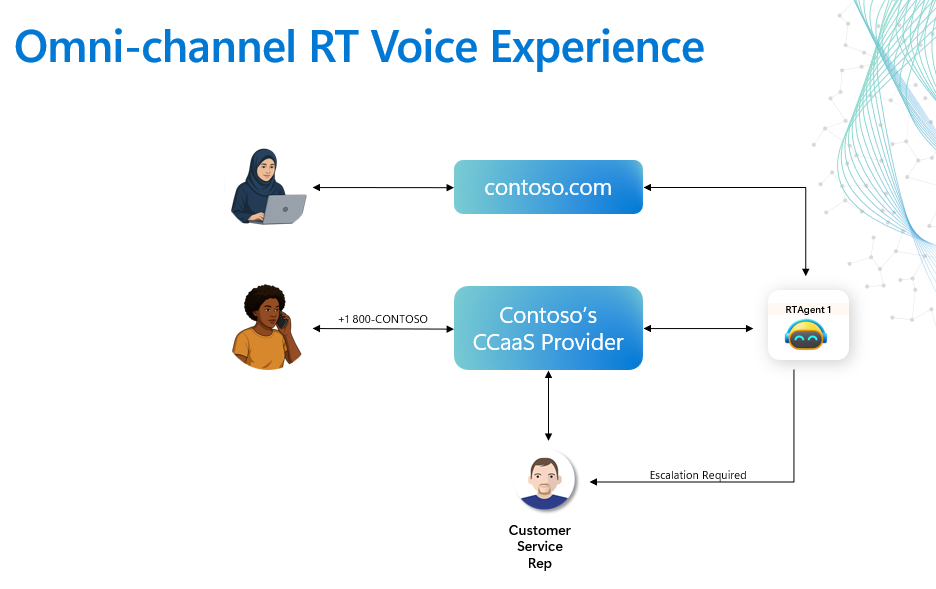
Show original conceptual PNG (legacy reference) →
Telephony built in
ACS integration for PSTN, SIP, IVR, barge-in. Works with contact centers out of the box.
Two orchestration modes
SpeechCascade for full control, VoiceLive for lowest latency. Same agent framework for both.
Multi-agent handoffs
YAML-defined agents with scenario-based routing. No code changes to rewire agent flows.
Tool registry
Shared tool store with MCP support. Every agent gets the same capabilities without duplication.
Sub-second latency
Connection pooling, streaming TTS, async everywhere. End-to-end turn target < 1 second.
Observable
OpenTelemetry traces, Application Insights, structured logging. Debug voice pipelines in production.
Quick Start (~25 min)
From clone to a working voice agent talking on the phone.
The first run is mostly doing the boring but necessary platform work: pulling the repo, logging into Azure, provisioning the runtime, building the containers, and waiting for Azure to finish wiring the services together. Once that foundation exists, local iteration is much faster.
1. Azure has to provision the platform
azd up creates the Azure resources, deploys the backend, and publishes the frontend URL.
2. Container builds take real time
The repo ships both Python and web assets, so the first build compiles images instead of just starting a script.
3. The long part is mostly waiting
Human effort is closer to a few minutes. The rest is Azure provisioning, image pushes, and service warm-up.
Use HTTPS to get started quickly, then switch remotes later if you prefer SSH.
# Clone and enter the repo
git clone https://github.com/Azure-Samples/art-voice-agent-accelerator.git
cd art-voice-agent-acceleratoraz login && azd auth loginazd up⚠️ Two extra steps before phones ring. azd up stands up the platform, but it does not deploy your app code or buy a phone number for you. To get a working voice agent on the phone, follow these two guides next:
- Deploy to Azure — push the backend + frontend to your provisioned Container Apps.
- Enable Phone Calling (ACS) — buy a phone number and wire the Event Grid subscription that routes inbound calls to your backend.
Prerequisites: Azure CLI, Azure Developer CLI, Docker (or Podman), Azure subscription with Contributor access. See full prerequisites.
Run locally instead
# After azd up has created your Azure resources:
make install          # Install Python + Node deps
make start_backend    # FastAPI on :8010
make start_frontend   # Vite on :5173
The backend needs a dev tunnel for ACS callbacks. See local development guide.
Recommended Regions
Pick a region with full coverage of the two binding AI dependencies:
the gpt-realtime audio model (powers VoiceLive mode and the realtime
cascade variant) and the Azure AI Voice Live endpoint. ACS, Speech, Cosmos, Redis,
and Container Apps are broadly available — the realtime audio surface is what narrows your choices.
Model naming as of mid-2026:
The current realtime audio model is gpt-realtime (GA 2025-08-28), with
gpt-realtime-mini, gpt-realtime-1.5 (2026-02-23), and
gpt-realtime-2 (2026-05-06) as newer variants. The legacy
gpt-4o-realtime-preview name is superseded — this accelerator defaults to
gpt-realtime across all agent configs.
| Region | gpt-realtime |
Voice Live | Speech / ACS / Cosmos / Redis | Recommendation |
|---|---|---|---|---|
| East US 2 | ✅ | ✅ Regional + Global | ✅ | Default — full coverage |
| Sweden Central | ✅ | ✅ Regional + Global | ✅ | EU data residency |
| West US 2 | ✅ | ✅ Regional + Global | ✅ | US West pairing |
| Southeast Asia | — | ✅ Regional + Global | ✅ | APAC — Voice Live only |
| Japan East | — | ✅ Regional + Global | ✅ | APAC — Voice Live only |
| Other major regions (East US, UK South, West Europe, France Central, Australia East, Brazil South…) | — | ✅ Global standard | ✅ | Voice Live works; gpt-realtime via auto-fallback → |
Voice Live has expanded well beyond its original four-region preview footprint —
Global Standard deployment is now live across most major Americas / Europe / APAC regions.
The five regions above additionally support Regional deployment
(data pinned to that region) and have hosted gpt-realtime since GA.
Not in a supported region? You don't need to move.
The azd up preflight detects when your primary AZURE_LOCATION
lacks gpt-realtime / Voice Live and will provision the Voice Live
Foundry endpoint in a supported region for you (defaulting to eastus2).
Your app, ACS, Cosmos, and the rest of the stack stay in your chosen region — only the
realtime AI endpoint is split out.
# Pin the Voice Live region explicitly (optional — azd will prompt otherwise)
azd env set AZURE_LOCATION             westeurope      # app + ACS + Cosmos here
azd env set TF_VAR_voice_live_location swedencentral   # gpt-realtime + Voice Live here
azd up
Always-current source of truth (region tables shift as Foundry expands availability):
gpt-realtime regional availability ↗
·
Voice Live regions ↗
Two Orchestration Modes
Same agent framework, different audio pipelines. Choose based on your latency and control requirements.
| SpeechCascade | VoiceLive | |
|---|---|---|
| Audio path | Azure Speech STT → LLM → TTS | Azure VoiceLive SDK (managed) |
| Latency | ~400ms | ~200ms |
| VAD | Custom (your thresholds) | Server-side (automatic) |
| Voices | 400+ Azure neural voices | HD voices (Ava, etc.) |
| STT customization | Custom Speech models, phrase lists | Built-in |
| Best for | On-prem, compliance, full control | Speed to production, lowest latency |
# Sets the DEFAULT orchestration mode for ACS telephony calls
export ACS_STREAMING_MODE=MEDIA       # SpeechCascade (default)
export ACS_STREAMING_MODE=VOICE_LIVE  # VoiceLive
ACS_STREAMING_MODE only sets the default pipeline that inbound ACS phone calls use — it doesn't change the agent framework. Both modes run the same agents.
Full orchestration architecture →
Repository Structure
art-voice-agent-accelerator/
├── apps/artagent/
│   ├── backend/              # FastAPI + WebSockets voice pipeline
│   │   ├── voice/            # Orchestrators (cascade, voicelive)
│   │   └── registries/       # Agents (YAML), tools, scenarios
│   └── frontend/             # Vite + React demo client
├── src/                      # Core libraries (ACS, Speech, AOAI, Redis, Cosmos)
├── infra/                    # Terraform + Bicep IaC
├── tests/                    # Unit, integration, load tests
├── samples/                  # Tutorials and labs
└── utils/                    # Logging, telemetry helpers
Next Steps
Architecture
Data flows, orchestration modes, agent framework, storage tiers.
BuildGuides
Create agents, add tools, deploy to production, run locally.
ExploreAgents & Scenarios
Pre-built agents for banking, insurance, healthcare. Scenario wiring.
ReferenceAPI Reference
REST endpoints, WebSocket protocol, MCP integration.